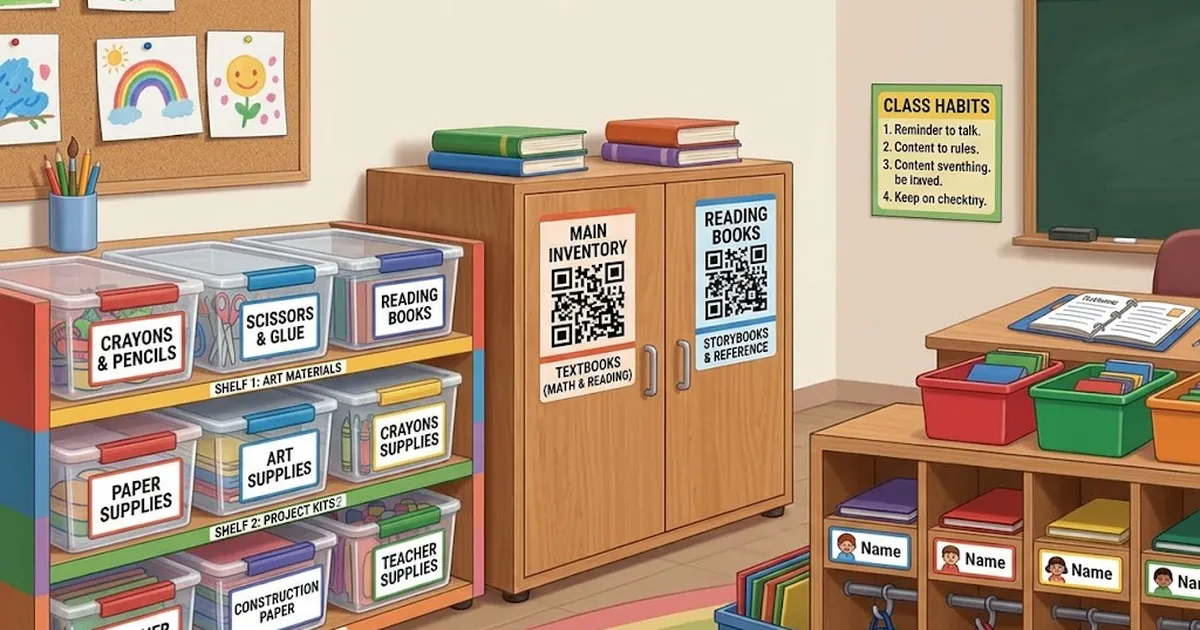
A well-organized classroom makes it easier for teachers to manage supplies and helps students know exactly where everything belongs. From books and art materials to technology and shared resources, clear classroom labels can turn a busy learning environment into a more structured and efficient space.
Traditional labels are useful, but modern classrooms can go a step further by combining simple organization with digital information. Smart labeling solutions can help teachers identify supplies, manage storage areas, and quickly access information without searching through every box or cabinet.
Why Classroom Organization Matters
A classroom contains many different types of materials. Teachers may need to manage worksheets, stationery, teaching aids, science equipment, craft supplies, books, games, and technology throughout the school year.
Without a clear system, supplies can quickly become difficult to find. Students may also return items to the wrong location, creating additional work for teachers.
A simple labeling system creates visual order. When every shelf, container, drawer, and storage area has a clear purpose, students can understand where items belong and take greater responsibility for keeping the room organized.
Start With Clearly Defined Storage Areas
Before adding labels, divide the classroom into practical storage zones. For example, you might create separate areas for:
- Books and reading materials
- Art and craft supplies
- Science equipment
- Student stationery
- Classroom games
- Technology accessories
- Teaching resources
- Extra worksheets and paper
Once these areas are established, give each one a clear name. Consistency is important. Use similar fonts, sizes, and formatting so students can quickly recognize the system.
You can also use smaller identifiers inside larger storage zones. A cabinet labeled “Art Supplies” could contain sections for markers, colored paper, paint, and brushes.
Make Storage Easy for Students to Understand
Good labels should be simple enough for students to understand at a glance. Avoid long descriptions when a short phrase will work.
For younger students, adding pictures or icons alongside words can make storage locations easier to identify. Older students may benefit from more detailed labels that include categories or instructions.
The goal is not simply to make the classroom look neat. The labeling system should make everyday routines faster.
When students know where materials belong, they can collect supplies independently and return them after an activity. This can reduce interruptions and give teachers more time to focus on instruction.
Add Digital Information With QR Codes
Physical labels can identify a container, but digital tools can provide additional information when needed. QR codes for the classroom can connect storage locations to digital records, instructions, checklists, or inventory information.
For example, a QR code attached to a science equipment box could provide a digital list of the items stored inside. A code on a technology cabinet could connect teachers to setup instructions or an equipment checklist.
This approach can be particularly helpful when several containers look similar. Instead of opening multiple boxes to find a particular resource, a teacher can scan the code and check the associated information.
Use QR Labels for Frequently Used Supplies
Some classroom resources move frequently between shelves, rooms, and activity areas. These items can benefit from QR labels that provide a quick way to identify and manage them.
Consider using them for:
- Technology kits
- Science equipment
- Classroom activity boxes
- Teaching resource containers
- Art supply bins
- Event or project materials
The system can make it easier to know what a container is, what it should contain, and where it belongs.
For schools with multiple classrooms, digital identification can also provide better visibility across shared resources. Teachers can spend less time searching for supplies and more time preparing lessons.
Create a Consistent Labeling System
A successful classroom organization system should be consistent throughout the room. Decide how labels will be named and formatted before creating a large number of them.
For example, use a structure such as:
Category → Item Type → Storage Location
You could label one container “Science → Magnets → Shelf 2” and another “Science → Measuring Tools → Shelf 3.”
Consistency makes the system easier to maintain when new materials are added. It also helps substitute teachers, assistants, and students understand the classroom layout without needing detailed explanations.
Keep Your Inventory Updated
Organization does not end when the first label is attached. Classroom supplies change throughout the year. Items may be borrowed, replaced, moved, or removed.
Set aside a few minutes at the end of each month or term to review storage areas. Remove outdated materials, update digital records, and check whether supplies are still stored in their assigned locations.
For valuable or shared equipment, keeping an updated digital inventory can be especially useful. It provides a clearer picture of what the classroom has and what may need replacement.
Build Better Classroom Habits
The best organization systems become part of the classroom routine. Teachers can introduce a simple “return it to its place” rule and show students how the labeling system works.
You can also assign students small organization responsibilities, such as checking a supply shelf or returning activity materials after group work.
When organization becomes a shared habit, maintaining the classroom becomes easier for everyone.
Final Thoughts
A thoughtfully organized classroom can improve daily routines, reduce unnecessary searching, and make learning materials easier to access. Clear labels provide the foundation, while digital tools can add another layer of convenience for teachers managing larger collections of supplies.
By combining practical storage zones, consistent naming, visual organization, and scannable information, schools can create classrooms that are easier to manage and simpler for students to navigate.
Smart organization is not about filling every shelf with labels. It is about creating a system that helps everyone find what they need, use it efficiently, and put it back where it belongs.