Category: QR Labels

  • Smart Moving Tips: Label Moving Boxes With QR Code Stickers

    Smart Moving Tips: Label Moving Boxes With QR Code Stickers

    Moving can feel overwhelming, especially when your home is suddenly filled with boxes. Packing is only half the challenge—the bigger problem often begins when it is time to unpack and find something you need.

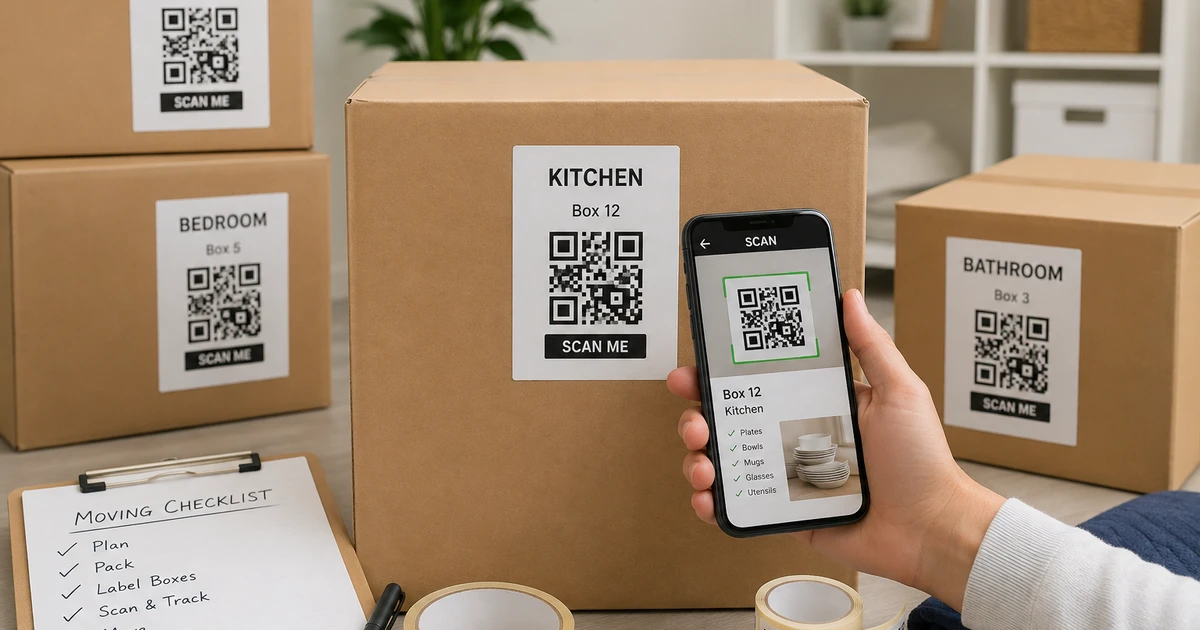
    A simple labeling system can make a major difference. Instead of relying only on handwritten descriptions, QR code stickers can connect each box to a digital record of its contents. This gives you a clearer way to organize belongings before, during, and after a move.

    The goal is not to create a complicated system. It is to make your belongings easier to identify, locate, and manage.

    Why Smart Labels Can Make Moving Easier

    A box marked “Kitchen” may tell you where it belongs, but it does not necessarily tell you what is inside.

    You may have several kitchen boxes containing cookware, dishes, appliances, pantry supplies, and small utensils. Once those boxes are stacked together, finding one specific item can mean opening multiple containers.

    QR labeling adds another layer of information. Each sticker can be connected to a digital record containing details such as item names, photos, categories, and notes.

    This approach follows a basic organizing principle: everything should have a clear place and an easy way to be found.

    Create a Simple System Before You Pack

    Before applying stickers, decide how you want to organize your boxes.

    Start with broad categories based on rooms:

    • Kitchen
    • Bedroom
    • Bathroom
    • Living room
    • Home office
    • Garage
    • Storage
    • Children’s room

    Then create smaller categories within each room.

    For example, instead of writing only “Kitchen,” use descriptions such as:

    • Kitchen – Cookware
    • Kitchen – Dinnerware
    • Kitchen – Small Appliances
    • Kitchen – Baking Supplies

    This makes the physical box easier to identify while also giving your digital inventory a logical structure.

    Label Moving Boxes With More Than Just a Room Name

    A useful label should answer at least two questions: Where does this box belong? What is inside it?

    You can add a box number, room name, category, and priority level. For example:

    Box 12 – Kitchen – Coffee & Breakfast Items – Open First

    A QR sticker can then provide additional information that would be difficult to fit on the outside of the box.

    You can record photographs, item descriptions, quantities, and notes digitally. That means the outside of the box stays simple while the detailed information remains accessible from your phone.

    Use QR Code Stickers to Build a Digital Inventory

    Once a box is packed, attach its unique QR sticker to a visible area.

    The QR code becomes the connection between the physical container and your digital inventory. When you scan it, you can check the information associated with that particular box rather than opening it to see what is inside.

    This can be especially useful when boxes are stored in a garage, basement, attic, storage unit, or moving truck.

    For larger moves, it also reduces the need to remember which box contains every individual item.

    Recommendation: Consider Elephant Trax

    If you want to take this approach beyond traditional labels, Elephant Trax is one option worth considering. Its QR-based inventory system is designed to connect physical storage containers with digital information. You can add photos and item details, then associate them with QR labels so you can check your belongings from your phone.

    This can be particularly helpful during a move because the same labels can remain useful after you arrive at your new home. Instead of creating a completely new organization method for long-term storage, you can continue using the inventory you’ve already created.

    Elephant Trax also positions its system for moving and storage, making it suitable for people who want to combine physical labeling with digital tracking.

    Add Photos While You Pack

    Photos can make a digital inventory much more useful.

    Before closing a box, take a quick picture of its contents. You do not need professional photographs. A simple photo can help you recognize the general contents later.

    For example, if you are looking for a particular kitchen appliance, you can check your inventory instead of opening several similarly labeled boxes.

    Photos are also useful for fragile or valuable belongings because they provide a visual record of what was packed.

    Create an “Open First” Category

    Not every box needs the same priority.

    Create a separate group for items you will need immediately after arriving. These might include:

    • Toiletries
    • Towels
    • Chargers
    • Basic cooking supplies
    • Coffee or tea
    • Important documents
    • Basic clothing
    • Cleaning supplies
    • Essential tools

    Clearly identifying these boxes can prevent the common situation where important everyday items end up buried underneath boxes that can wait.

    Make Your Labels Easy to Scan

    Placement matters just as much as the label itself.

    Put the QR sticker somewhere visible and easy to reach. If boxes will be stacked, consider placing a sticker on both the top and side when appropriate.

    Avoid locations that are likely to be covered by packing tape, damaged during transportation, or hidden underneath another box.

    The objective is simple: when you need information, you should be able to scan the code without moving half the stack.

    Keep Your Organization System After the Move

    One of the biggest benefits of using a digital inventory is that it does not have to end when the move is complete.

    Your boxes may eventually move from the living room into a garage or storage area. Seasonal decorations may remain packed for months. Extra household items may stay in storage until you need them.

    A good organization system should continue working as your storage changes.

    This is where organization systems for home can become more useful than one-time decluttering. The focus shifts from simply making a space look tidy to creating a system that helps you find and return things easily.

    You can also update the digital record when a box is opened, items are removed, or its location changes.

    Think Beyond Moving Day

    A smart labeling method can help with more than unpacking.

    Once your belongings are digitally organized, you can use the same approach for:

    • Seasonal storage
    • Garage organization
    • Holiday decorations
    • Keepsake boxes
    • Children’s belongings
    • Home office supplies
    • Important household items

    Instead of creating separate systems for every storage area, you can build one consistent method that works throughout your home.

    Final Thoughts

    A successful move is not just about getting everything from one house to another. It is about being able to find your belongings once they arrive.

    Simple descriptions, clear categories, photographs, and QR technology can turn a collection of anonymous boxes into a system that is much easier to manage.

    The best approach is one that remains useful after moving day. By connecting physical containers with digital information, you can spend less time searching through boxes and more time settling into your new home.

    For anyone looking to make moving and long-term storage easier, QR-based labeling offers a practical step toward a more organized home.


  • Classroom Storage Ideas for a More Organized and Productive Learning Space

    Classroom Storage Ideas for a More Organized and Productive Learning Space

    A well-organized classroom can make the school day easier for both teachers and students. When supplies, learning materials, books, and activity resources have designated places, less time is spent searching and more time can be focused on teaching. A practical organization system does not need to be expensive or complicated. With the right containers, labels, and storage habits, even a small classroom can feel more spacious and manageable.

    Start With Storage Zones

    Before adding containers, divide the room into functional zones. Consider creating separate areas for books, art supplies, student work, technology, teaching materials, and frequently used classroom supplies. Keeping similar items together makes them easier to access and return.

    Materials used every day should remain within easy reach, while seasonal decorations and rarely used resources can be placed on higher shelves or inside cabinets. This approach prevents frequently needed items from becoming buried behind materials that are only used occasionally.

    Clear organization also helps students become more independent. When they know where supplies belong, they can collect and return materials without constantly asking the teacher for assistance.

    Choose Containers That Fit the Space

    The right containers can transform crowded shelves and cabinets. Transparent containers are especially useful because teachers can see their contents without opening every box. Smaller containers can hold pencils, craft materials, manipulatives, flashcards, and other loose supplies.

    For larger materials, sturdy teacher storage bins can be grouped by subject, activity, or classroom routine. For example, one container might hold science experiment materials while another stores reading-group resources.

    Avoid filling every container to its maximum capacity. Leave enough room for students and teachers to return items easily. An organized container that is difficult to use will eventually become cluttered again.

    Label Everything Clearly

    Labels are one of the simplest ways to maintain an organized learning environment. Each shelf, drawer, and container should have a clear purpose. Use short descriptions such as “Math Games,” “Art Supplies,” “Reading Materials,” or “Extra Paper.”

    For younger students, combine words with simple pictures or symbols. This can make it easier for children to identify where items belong, even before they become confident readers. Clear labeling is also recommended as part of effective classroom material organization.

    Consistent labels create a simple system: take an item, use it, and return it to its assigned location. That small routine can prevent clutter from building throughout the school day.

    Make Student Access Simple

    Storage should support classroom routines rather than interrupt them. Place commonly used supplies where students can safely reach them. For example, book bins can be positioned near the reading area, while art supplies can stay close to the activity table.

    Create designated locations for completed work, unfinished assignments, borrowed materials, and items waiting to be returned. This prevents papers and supplies from collecting on desks or becoming mixed together.

    It is also helpful to teach students the storage system at the beginning of the school year. A few minutes spent explaining where things belong can save considerable time later.

    Use Digital Organization Alongside Physical Storage

    Physical storage solves only part of the problem. Teachers may also have closets, cabinets, shelves, and boxes containing materials that are not used every day. Remembering what is inside every container can become difficult, especially after several months.

    This is where QR codes for the classroom can add another layer of organization. A QR label attached to a storage container can connect the physical box to digital information about its contents. Instead of opening several boxes to locate a specific resource, a teacher can scan the code and check what has been stored inside.

    This approach can be particularly helpful for seasonal teaching materials, curriculum resources, classroom games, technology accessories, and archived student projects.

    Review Storage Throughout the School Year

    A storage system should not be considered finished after the first week of school. Classroom needs change as lessons, projects, and student routines change.

    Set aside a few minutes every month to check shelves, drawers, and containers. Remove broken or outdated supplies, combine partially filled containers, and move frequently used materials to more convenient locations.

    At the end of a unit, return its materials to their assigned storage area before beginning the next one. A simple reset routine can prevent small amounts of clutter from becoming a major organizational problem.

    Create a System That Is Easy to Maintain

    The best classroom organization system is one that teachers and students can maintain without extra effort. Instead of trying to make every shelf look perfect, focus on making every item easy to find and return.

    Use clearly defined zones, practical containers, simple labels, and digital tracking where useful. These small improvements can make storage more functional while helping students develop responsibility for their shared environment.

    Ultimately, effective classroom storage is not about having the most shelves or the largest collection of containers. It is about creating a system that gives every item a logical home. When storage works with daily classroom routines, teachers can spend less time searching and more time creating a productive, welcoming space for learning.

  • How to Organize Moving Boxes With Smart Labels

    How to Organize Moving Boxes With Smart Labels

    Moving to a new home can be exciting, but keeping track of packed belongings is often one of the most stressful parts of the process. Once dozens of boxes are taped shut and stacked together, finding one specific item can become surprisingly difficult.

    Writing a room name on each box is helpful, but it does not always tell you exactly what is inside. This is where smart moving box labels can make a difference. By combining physical labels with QR technology, you can create a simple system that connects each box to a digital record of its contents.

    Instead of opening several boxes to find one item, you can identify the right container more efficiently. With a QR-based system such as Elephant Trax, moving boxes can become part of a searchable digital inventory.

    Why Moving Boxes Need More Than Basic Labels

    Traditional labels usually contain information such as “Kitchen,” “Bedroom,” or “Garage.” While this is useful, it provides only a general idea of what is inside.

    For example, imagine that you have packed six kitchen boxes. One contains your coffee machine, another contains plates, and another contains baking supplies. If all six are simply marked “Kitchen,” you may still have to open several boxes before finding what you need.

    A more organized approach is to give every box its own identity and record its contents digitally.

    Smart labels can help solve this problem by connecting the physical box to information that can be accessed through a QR code.

    Start by Creating a Packing System

    Before applying your labels, divide your belongings into logical groups. Organizing by room is usually the easiest approach.

    You could create categories such as:

    • Kitchen
    • Bedroom
    • Living room
    • Bathroom
    • Home office
    • Garage
    • Children’s room
    • Seasonal storage

    Next, divide each room into smaller groups. For example, instead of labeling a box simply “Kitchen,” you could identify it as:

    Kitchen Box 01 – Cookware
    Kitchen Box 02 – Dinnerware
    Kitchen Box 03 – Small Appliances

    This makes the physical organization clearer and gives your digital inventory a useful structure.

    Connect Each Box to a QR Label

    Once your boxes are packed, assign a unique QR label to each one.

    The concept is simple: the physical label identifies the box, while the digital inventory provides additional information about what is stored inside.

    Elephant Trax QR labels are designed to work with the Elephant Trax app. Users can attach a label, add photographs and keywords for their belongings, and associate those items with the corresponding QR code.

    This creates a connection between the box sitting in your hallway, garage, storage unit, or moving truck and the information stored digitally.

    Add Useful Information to Your Inventory

    The more useful information you add while packing, the easier it can be to locate belongings later.

    For each box, consider recording:

    • Box number
    • Room
    • Item names
    • Photos
    • Quantity
    • Category
    • Storage location
    • Special notes
    • Priority level

    Photos can be particularly useful. If you have several boxes containing similar household items, an image can help you quickly recognize the contents without opening the container.

    Elephant Trax describes its system as providing visual inventory access and allowing users to add photos and keywords associated with QR labels.

    Label Boxes According to Priority

    Not every box needs to be unpacked immediately.

    One useful strategy is to divide your boxes into three priority levels:

    Open First

    These boxes contain things you will need immediately after arriving, such as toiletries, chargers, basic kitchen supplies, towels, medicines, and essential clothing.

    Open Soon

    These contain items you will probably need during the first few days but can live without temporarily.

    Store for Later

    These may include seasonal decorations, rarely used kitchen equipment, extra bedding, keepsakes, and other belongings that do not need immediate attention.

    Adding priority information to your inventory can make the first few days in your new home much less chaotic.

    Put Labels in Easy-to-See Locations

    A QR label is most useful when you can easily see and scan it.

    Place the label on a flat, visible section of the box. If boxes will be stacked, think about which side will remain accessible. Avoid placing labels underneath boxes or in areas that are likely to become damaged during transportation.

    Durability is another important consideration when selecting moving box labels. Elephant Trax lists its labels as fade-resistant, tear-resistant, and resistant to water or moisture. The labels are also available in 40-, 80-, and 160-label quantities and have a listed size of 3 × 2 inches.

    Make Unpacking More Efficient

    The real advantage of smart labeling becomes apparent when you reach your new home.

    Instead of opening boxes randomly, you can use your inventory to determine which container contains the item you need.

    For example, suppose you want to make coffee on your first morning in the new house. Rather than opening every kitchen box, you can use your digital inventory to identify the box containing your coffee machine.

    This approach can be particularly helpful when movers have placed dozens of boxes in different rooms.

    Keep the System Useful After the Move

    One mistake people make is treating labels as useful only during moving day.

    A good inventory system can continue to provide value long after the move is finished.

    Your moving boxes may eventually go into:

    • An attic
    • Basement storage
    • Garage shelving
    • A storage unit
    • A closet
    • A seasonal storage area

    If the contents remain digitally recorded, you can continue using the same system to locate belongings months or even years later.

    This turns a temporary moving system into a longer-term home organization and inventory solution.

    Recommended Smart Moving Box Labels: Elephant Trax

    If you are looking for QR-based moving box labels, Elephant Trax Smart Storage QR Labels are worth considering.

    The official Elephant Trax product page states that its QR labels work with the free Elephant Trax app, allowing users to attach labels, photograph belongings, add keywords, and associate items with individual QR labels. The product is specifically positioned for moving, storage, and inventory tracking.

    The labels are available in packs of 40, 80, and 160, which gives users flexibility depending on the size of their move. The product page also lists compatibility with iOS and Android and describes each label as having a unique QR code.

    For a small apartment move, a smaller pack may be sufficient. Larger households or people who also want to organize long-term storage may benefit from having more labels available.

    An additional product reference for Elephant Trax describes the 40-label version as smart QR code stickers intended for storage bins, moving boxes, home organization, packing, and inventory tracking. The page was updated on August 19, 2026.

    You can learn more about the product through the Elephant Trax official product page or review the additional product reference you provided.

    Final Thoughts

    Organizing moving boxes does not have to mean writing a room name on every container and hoping you remember what is inside. A smarter system can give every box a unique identity while keeping detailed information available digitally.

    By combining clear physical organization with QR technology, you can make packing, moving, unpacking, and long-term storage easier to manage.

    For people who want a dedicated QR-based approach, Elephant Trax provides smart labels that connect physical storage containers with a digital inventory. With the right labeling strategy, your next move can become less about searching through boxes and more about knowing exactly where your belongings are.